Uno de los problemas que hay en el editor de WordPress es que algunas veces los themes tienen diseños específicos que no se muestran en el editor. Actualmente, el uso de Bootstrap está cada vez más extendido, por lo que es buena idea añadir la opción de meter columnas en los posts de forma sencilla.
Lo primero que deberemos hacer es añadir en el functions.php el código necesario para añadir un botón al TinyMCE:
add_action( 'init', 'sw_mce_buttons' );
// Filtros para añadir los botones
function sw_mce_buttons() {
    add_filter( "mce_external_plugins", "sw_mce_add_buttons" );
    add_filter( 'mce_buttons', 'sw_mce_register_buttons' );
}
// Añade el script del plugin tinymce
function sw_mce_add_buttons( $plugin_array ) {
    $plugin_array['iqn'] = get_template_directory_uri() . '/js/tinymce-plugin.js';
    return $plugin_array;
}
// Un nuevo botón que se identifica como 'bootstrap'
function sw_mce_register_buttons( $buttons ) {
    array_push( $buttons, 'bootstrap' );
    return $buttons;
}
// Añadimos el css de bootstrap y uno propio para personalizar cosas
function sw_mce_css($wp) {
	$wp .= ',' . get_bloginfo('stylesheet_directory') . '/bootstrap/bootstrap.min.css'.',' . get_bloginfo('stylesheet_directory') . '/css/tinymce.css';
	return $wp;
}
add_filter( 'mce_css', 'sw_mce_css' );
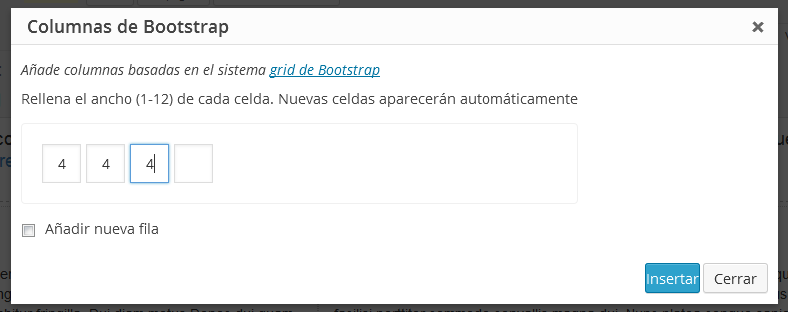
Después tenemos que crear el javascript para el plugin de TinyMCE:
(function() {
    // Creamos el plugin
    tinymce.create('tinymce.plugins.iqn', {
        init : function(ed, url) {
          // Muestra el dialogo que permite personalizar las columnas
          // Mostrará una caja de texto donde se pondra el ancho de la columna
          // de 1 a 12, y cuando se indique un valor, automáticamente se añadirá otra columna
          function bootstrapDialog() {
            var html = '<div class="bootstrap-dialog">';
            html += '<p class="howto">Añade columnas basadas en el sistema <a href="http://getbootstrap.com/css/#grid">grid de Bootstrap</a></p>';
            html += '<p>Rellena el ancho (1-12) de cada celda. Nuevas celdas aparecerán automáticamente</p>';
            html += '<div class="columns_container"><input type="text" class="column_width" /></div>';
            html += '<p><input type="checkbox" id="new_row" name="new_row" /> <label for="new_row">Añadir nueva fila</p>';
            html += '</div>';
            var panel = {
                type: 'container',
                html: html
            };
            // Abre el dialogo
            win = ed.windowManager.open({
                title: "Columnas de Bootstrap",
                spacing: 10,
                padding: 10,
                items: [panel], // el panel creado antes
                buttons: [ // Botones
                    {text: "Insertar", subtype: 'primary', onclick: function() {
                        var content = ed.getContent();
                        var html = ' ';
                        // Si se marca la casilla, se añade una fila
                        if (jQuery('#new_row:checked').length == 1) html += '<div class="row">';
                        // Por cada columna, se crea una capa
                        jQuery('.column_width').each(function() {
                          var $this = jQuery(this);
                          if ($this.val()) html += '<div class="col-sm-'+$this.val()+'">Columna tamaño '+$this.val()+'</div>';
                        });
                        if (jQuery('#new_row:checked').length == 1) html += '</div>';
                        ed.execCommand('mceInsertContent', false, html);
        	        win.close();
                    }},
                    {text: "Cerrar", onclick: function() {
  	                win.close();
                    }}
                ]
             });
          }
          ed.addButton('bootstrap', {
              title : 'Columnas Bootstrap',
              onclick: bootstrapDialog
          });
        },
        createControl : function(n, cm) {
            return null;
        },
        getInfo : function() {
            return {
                longname : 'Bootstrap columns',
                author : 'SentidoWeb',
                version : "0.1"
            };
        }
    });
    // Register plugin
    tinymce.PluginManager.add( 'iqn', tinymce.plugins.iqn );
})();

jQuery(document).ready(function() {
  // Se crea una casilla nueva si se actualiza el contenido de la última
  jQuery('body').on('keyup', '.column_width', function() {
    var $this = jQuery(this);
    var $inputs = jQuery('.column_width');
    if($this.val()) {
      if ($inputs.index(this) == $inputs.length - 1) {
        $this.after('<input type="text" class="column_width" />');
      }
    }
  });
});
Y ya por último, crearnos el fichero tiniymce.css que se incluirá en el contenido del editor. Yo simplemente he recuadrado los elementos para que se diferencien en el editor:
.row {padding: 4px; border: 1px dashed #bbb;}
.col-sm-1,
.col-sm-2,
.col-sm-3,
.col-sm-4,
.col-sm-5,
.col-sm-6,
.col-sm-7,
.col-sm-8,
.col-sm-9,
.col-sm-10,
.col-sm-11,
.col-sm-12 {xmargin: 4px; border: 1px dotted #ccc;}
Y si modificáis el diseño del admin, podéis aprovechar ese css para añadir el css necesario para el botón.
i.mce-i-bootstrap {
	font: normal 20px/1 'dashicons';
	padding: 0;
	vertical-align: top;
	speak: none;
	-webkit-font-smoothing: antialiased;
	-moz-osx-font-smoothing: grayscale;
	margin-left: -2px;
	padding-right: 2px;
}
i.mce-i-bootstrap:before {
	content: '\f479';
}
.bootstrap-dialog p {padding: 5px 0;}
.bootstrap-dialog p a {color: #0074A2; text-decoration: underline;}
.mce-container .columns_container {border: 1px solid #F0f0f0; padding: 20px; border-radius: 4px; margin: 10px 0;}
.mce-container .columns_container input.column_width {
    margin-right: 5px;
    padding: 9px 3px;
    text-align: center;
    width: 39px;
}